
Computer Repairs South Broken Hill
Slow laptop? Freezing PC? Wi-Fi dropping out? Bizup makes repairs simple and stress-free—clear diagnostics, careful fixes, and advice to stop repeat issues.
Snapshot for busy readers
- Plain-English Computer Repairs South Broken Hill for homes and small businesses
- Smart diagnostics, careful repairs, and practical prevention (no jargon)
- Windows and macOS support: laptops, desktops, Wi-Fi, printers, and cloud tools
- On-site, pickup/return, and remote assistance to suit your day
- Clear communication at every step and tips you’ll actually use
Reliable Computer Repairs South Broken Hill
Tech is brilliant when it works and a headache when it doesn’t. If your laptop’s crawling, your PC keeps freezing, or your Wi-Fi drops out right when you need it, you’re not alone. At Bizup, we make Computer Repairs in South Broken Hill simple and stress-free. We listen first, fix carefully, and leave you with practical advice so the same problem doesn’t boomerang back next week.
We’re locals, which means we value straightforward service and your time. Whether you’re a family juggling schoolwork and streaming, a tradie quoting on the go, or a small office that needs reliable devices, we’ll help you get back on track—calmly and quickly.
Why locals choose Bizup for Computer Repairs South Broken Hill
Friendly, human support
No techno-babble. We explain what’s wrong, what matters most, and your options in plain English.
Data-aware by default
Your photos, invoices, and client records are precious. Our approach prioritises keeping your data safe while we troubleshoot and repair.
Solutions that fit real life
We recommend fixes that suit how you actually use your gear—at the kitchen table, in the shed, or across a busy office.
Prevention that sticks
Security, updates, and backups shouldn’t be a chore. We set you up with sensible tools and simple routines that won’t slow you down.
What “computer repairs” really covers
Computer repairs are more than replacing parts. It’s the whole ecosystem that makes your digital life work:
- Hardware repairs: failing hard drives, tired batteries, noisy fans, broken screens, dodgy ports, overheating
- Software fixes: blue screens, boot loops, failed updates, app crashes, driver conflicts
- Data recovery & backup: retrieving files where possible and setting up a resilient backup plan
- Performance tune-ups: clearing bloat, trimming start-up items, optimising storage and memory
- Networking & Wi-Fi: dead zones, dropouts, printer sharing, NAS and cloud access
- Security & malware clean-ups: removing infections, patching holes, and restoring safer defaults
- Upgrades: SSDs and RAM, docks, Wi-Fi gear—sensible improvements that extend device life
If it touches your computer life in South Broken Hill, chances are we can help.
Common problems we fix (and how we approach them)
1) Sluggish devices
Symptoms: slow boot, apps take ages, and fans rev for no reason. Our approach: quick diagnostics to find the bottleneck; remove background hogs and unwanted apps; check drive health; recommend upgrades (like SSDs) when they’ll genuinely help.
2) Crashes, freezes, and blue screens
Symptoms: random restarts, error codes, freezes during video calls or games. Our approach: hardware checks (RAM, thermals, power), driver/OS repair, firmware updates, and stability testing so the fix sticks.
3) Won’t boot or is stuck on a logo
Symptoms: endless spinning circle, black screen, “No boot device.” Our approach: data-first triage, safe boot repair, file system checks, clean OS reinstall if it’s the wisest route—migrating your files where possible.
4) Wi-Fi trouble & network gremlins
Symptoms: dropouts, weak signal in the back room, “printer offline.” Our approach: Wi-Fi survey and channel planning, mesh or access point setup, tidy printer sharing and naming so everything just works.
5) Noisy fans & overheating
Symptoms: device runs hot, loud, and slow. Our approach: dust clean, thermal paste refresh (where appropriate), airflow tweaks, and power plan tuning for cooler, quieter operation.
6) Ports, power & charging
Symptoms: loose charging jack, flaky USB, unreliable HDMI/DisplayPort. Our approach: careful inspection, board-level checks where suitable, connector repair or replacement, and cable best-practice tips to prevent repeats.
7) Printer & scanner drama
Symptoms: drivers in a twist, queues jammed, shared printing that never stays shared. Our approach: driver resets, network configuration that actually sticks, and a quick run-through before we leave.
Our Computer Repairs South Broken Hill services
Friendly diagnostics
We start with your story—what’s happening, when it began, and what matters most (photos, deadlines, client work). Then we run targeted tests to identify the fault quickly and safely.
Hardware repairs & replacements
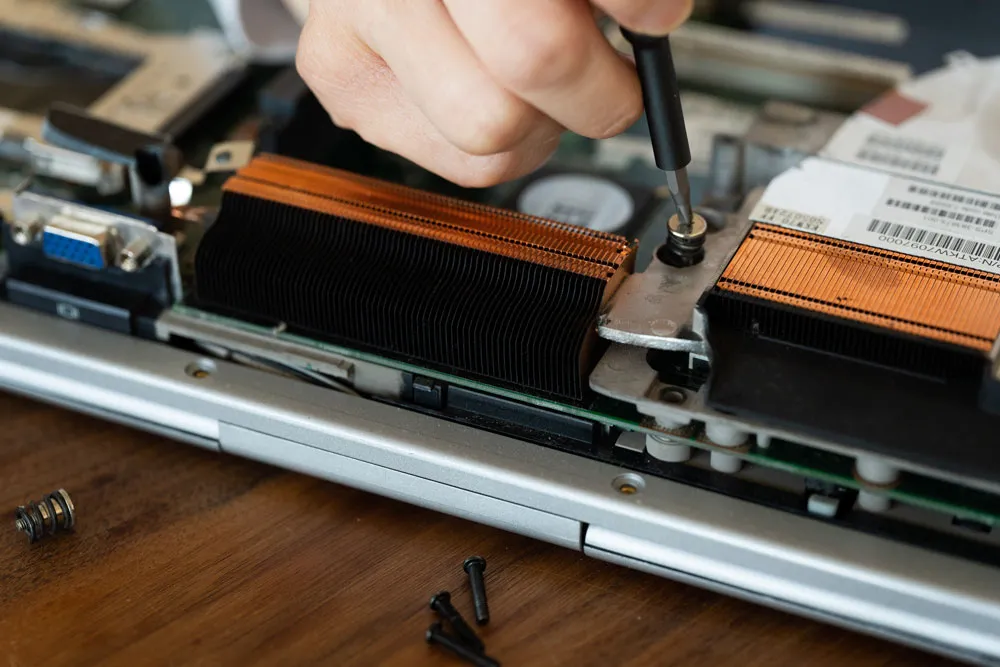
From storage and batteries to screens, keyboards, and ports, we handle careful disassembly and reassembly. Every repair is followed by checks to confirm the device is stable and responsive.
Software repair & OS refresh
We fix update loops, restore broken boot loaders, resolve driver conflicts, and when it’s the cleanest solution, perform a tidy reinstall with data migration.
Data recovery & backup planning
If a drive looks sick or files are missing, we’ll assess recovery options and retrieve what we can. Then we help set up a straightforward backup routine so one hiccup doesn’t become a disaster.
Performance tune-ups
We remove junk, trim start-up items, optimise storage, and fine-tune settings so your device feels snappy again.
Security & malware clean-ups
We remove infections carefully, reset compromised settings, update the system, and leave you with practical prevention steps you’ll actually follow.
Networking & Wi-Fi optimisation
We stabilise connections, improve coverage, set up guest networks and parental controls if needed, and make sure printers and smart gear behave.
Sensible upgrades
We recommend upgrades only when they deliver real value. An SSD or RAM bump often extends the life of a perfectly good machine.
Small business support
We help local teams with device rollouts, shared storage, email and cloud setup, basic access control, and continuity planning that fits a small office budget and schedule.
How we work (simple and transparent)
- Say hello – Tell us what’s going on and what’s urgent.
- Choose the format – On-site, pickup/return, or remote assistance, depending on the issue.
- Diagnostics – We pinpoint the fault and outline options in plain English.
- Repair & optimise – We fix the problem and tidy any related snags while we’re at it.
- Protect & prevent – Updates, security, backups, and practical tips to keep things smooth.
- Handover – A short, clear summary of what we did and what to watch next.
For homes: calm, reliable tech
- Schoolwork, streaming, and banking without the glitches
- Sensible parental controls and safer app store habits
- Photo backup that doesn’t require a degree to manage
- Wi-Fi that reaches the spare room and patio without dropouts
For small businesses: momentum without the mess
- Minimal-disruption repairs and after-hours options by arrangement
- Stable email, shared folders, and printers that stay online
- Practical password hygiene and access basics
- Backup workflows that protect essential files without daily fuss
- Honest advice on when to upgrade and when to maintain
What to try before you call (no worries if it’s not your thing)
- Restart properly: shut down fully, wait 30 seconds, power back on.
- Cable check: reseat power leads, HDMI/DisplayPort, and USB devices.
- Free up space: if storage is nearly full, clear downloads and temp files.
- Run updates: if the device is stable, install pending system updates.
- Note errors: a quick photo of pop-ups or codes helps us diagnose faster.
If that doesn’t fix it, we’ll take it from there—calmly and carefully.
Smart habits that prevent repeat issues
- Auto-updates on: OS, browser, and key apps
- Reputable protection: keep it active and let it update itself
- Backups scheduled: cloud or external drive (or both)
- Be choosy with downloads: stick to official stores and vendors
- Email sense check: hover on links and double-check the sender
- Tidy start-up apps: fewer auto-launchers, faster mornings
- Wi-Fi basics: strong passphrase, guest network for visitors, clear device names
These small changes add up to big reliability gains.
FAQs
How quickly can you help? Turnaround depends on the issue and parts availability. Some fixes are quick; deeper repairs take longer. After diagnostics, we’ll explain the steps so you know what to expect.
Can you help if I can’t bring the computer in? Yes—remote sessions solve many software problems, and we can arrange pickup/return for hardware work around South Broken Hill.
Will my files be safe? We focus on preserving your data. If there are risks, we’ll explain them first and discuss options before making changes.
Do you service Macs as well as PCs? Absolutely—macOS and Windows, laptops and desktops.
Is my older machine worth saving? Often, yes. An SSD and extra memory can transform everyday performance. We’ll give you a balanced view so you can decide.
Can you sort my Wi-Fi dead zones? Usually! We’ll plan coverage and set up the right gear—mesh or access points—to fill the gaps.
The Bizup difference, in plain words
- People-first service: We listen, explain, and keep things simple.
- Careful workmanship: Tidy screws, neat cables, and tested systems.
- Thoughtful security: Safer defaults without slowing you down.
- Local accountability: We’re part of the community, and our reputation matters.
When you search for Computer Repairs South Broken Hill, you deserve help that treats your tech like it’s our own. That’s how we operate.
Ready to get back on track?
If your computer’s misbehaving—slow boots, strange noises, Wi-Fi tantrums, mystery errors—Bizup is ready to help. Our Computer Repairs South Broken Hill service is built for locals who want reliable fixes, honest advice, and zero fuss.
Contact Bizup today to book diagnostics. We’ll find the fault, repair it carefully, and hand your device back cleaner, faster, and more secure—without the headache.
Handy “keep-it-running” checklist (printable)
- Auto-updates for the system and browsers
- Reputable security is installed and active
- Backups running and tested weekly/fortnightly
- Start-up apps trimmed for faster mornings
- Wi-Fi is named clearly with a strong passphrase and a guest network
- Downloads only from official stores/sites
- Email sense check—pause before clicking links or attachments
- External drives ejected safely and stored cool/dry
Tick a few of these today and you’ll avoid most common headaches.
Meta suggestions (for your website team)
- SEO Title: Computer Repairs South Broken Hill | Bizup
- Meta Description: Local, friendly computer repairs in South Broken Hill. Bizup fixes hardware and software issues, protects data, and keeps devices running smoothly. Book your diagnostic today.
- Suggested URL Slug: /computer-repairs-south-broken-hill
When you need Computer Repairs in South Broken Hill, choose Bizup for a calm, practical approach that protects your time, your files, and your peace of mind.